Your Aspera renewal quote just landed, and the number is bigger than last year's. Before you sign, it is worth knowing what a credible IBM Aspera alternative looks like today. Both Raysync and IBM Aspera replace slow TCP-based tools with UDP-accelerated transport, so the real decision comes down to features, licensing model and total cost. This guide compares them side by side and shows where Enterprise File Transfer from Raysync fits.
Speed is only half the job. Most teams also need scheduling, audit trails and access control around every file that moves, which is the territory of Managed File Transfer. We cover both: raw acceleration and the governance layer that sits on top of it.
Every IBM price below comes from IBM's own public pricing page, checked on October 22, 2026. Where a number is a model rather than a measurement, we say so and show the math.
- IBM Aspera's public list prices start at $22.10/month (Essentials, 1 TB/year) and $1.07/GB (Pay As You Go); the self-managed Lite license lists at $11,916/year.
- Both products use UDP-based acceleration to beat TCP's latency ceiling on long, lossy links.
- Raysync Enterprise adds two-way sync, P2P transfer, secure sharing links and AI-agent file operations to its acceleration layer.
- Raysync Enterprise pricing is customized, so compare it against your own Aspera quote, not a generic claim.
- A phased migration (pilot one workflow, then cut over) keeps risk low.
What is an IBM Aspera alternative?
An IBM Aspera alternative is any accelerated file transfer platform that moves large files over long-distance networks faster than FTP, SFTP or HTTP, without depending on IBM's FASP protocol or licensing. Buyers usually look for one when renewal costs climb, when they need features Aspera prices as add-ons, or when they want one platform for transfer, sync and sharing.
That last point matters. Automated, system-to-system file movement (transfer and MFT) is a different job from people collaborating on documents. Collaboration-focused platforms such as Enterprise File Sync and Share handle shared folders and external links, while transfer platforms handle bulk, scheduled and machine-driven data movement. Raysync Enterprise is built to cover both jobs, while IBM's Aspera pages lead with high-speed transfer.
Why is TCP slow over long distances?
A single TCP stream slows down as round-trip time (RTT) and packet loss rise, because classic TCP congestion control halves its sending window every time it detects loss. Mathis et al. (1997) captured this in a simple model: throughput ≈ (MSS ÷ RTT) × (1.22 ÷ √loss rate).
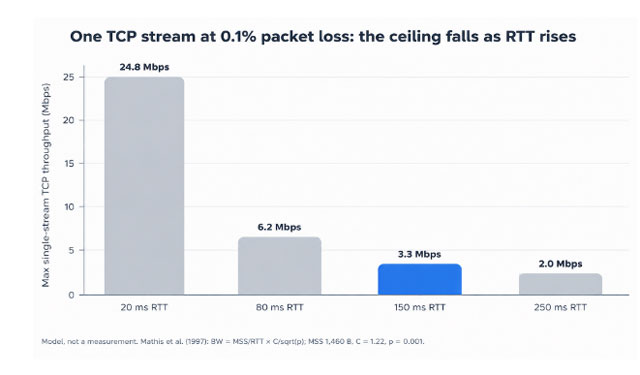
At 150 ms RTT and 0.1% loss, one TCP stream tops out near 3.0 Mbps. Moving 1 TB (8 × 10¹² bits) at that rate takes about 31 days. At 900 Mbps of effective throughput, the same terabyte takes about 2.5 hours. That gap is why both vendors built their own UDP-based transport instead of tuning TCP.
How do Raysync and IBM Aspera compare on speed?
Both Raysync and IBM Aspera use UDP for bulk data and their own congestion control, so on long-haul links each can run far above a single TCP stream's ceiling. Real-world speed depends on your bandwidth, RTT, loss, disk I/O and file mix, so test both on your own routes.
IBM's FASP security model describes the architecture: the client opens an SSH session, then negotiates a UDP port (33001 by default) for the data stream. Each session gets a random AES key of 128, 192 or 256 bits. IBM's Aspera page promises to "deliver massive, critical data 100x faster"; treat any vendor multiplier, ours included, as a best-case figure until you benchmark.
Raysync Enterprise uses a proprietary UDP-based WAN acceleration protocol with intelligent UDP/TCP switching, so the transport can adapt to the network path. Checkpoint resume picks up interrupted jobs where they stopped, and transfer verification confirms the file that arrived matches the file that left.
Our advice: pick three real routes (one domestic, two intercontinental), send the same 100 GB mixed dataset with each product, and compare wall-clock time and retries. That beats any datasheet number.
Feature comparison: Raysync Enterprise vs IBM Aspera
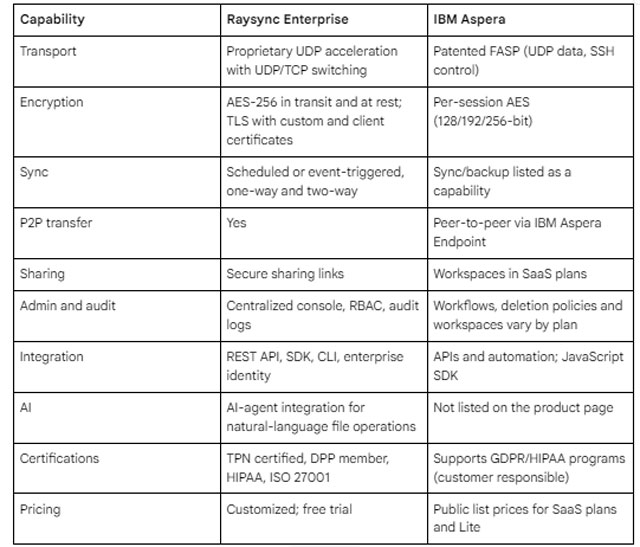
IBM's lineup now splits into SaaS plans (Pay As You Go, Essentials, Standard Plus) and self-managed products (IBM Aspera Enterprise, Lite, Endpoint and faspio Gateway). On the desktop, IBM is replacing Aspera Connect with IBM Aspera for desktop. IBM's March 2026 update says Connect support with Aspera on Cloud ends December 31, 2026, and all Aspera web applications drop Connect from March 31, 2027, when it leaves download. That replaces the June 2026 date in IBM's July 2025 announcement, but existing users face a client migration either way.
How much does IBM Aspera cost?
IBM Aspera's public list prices range from $22.10 per month for Essentials (1 TB a year) to $660 per month for Standard Plus (6 TB a year), with Pay As You Go at $1.07 per GB and the self-managed Lite license at $11,916 per year. IBM Aspera Enterprise has no public list price on IBM's page.
These come from IBM's Aspera pricing page. The AWS Marketplace listing for IBM Aspera on Cloud matches them on a 12-month contract: $265.20 for Essentials and $7,920 for Standard Plus, plus overage and egress charges.
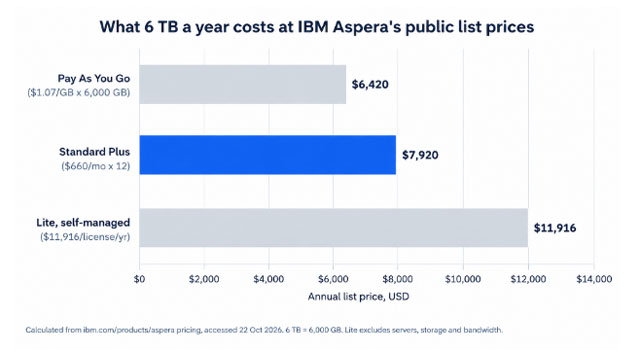
Three things the list price hides:
- Volume caps. SaaS plans are sized by yearly transfer volume. A team that grows from 6 TB to 20 TB a year pays overage or moves up a tier.
- Infrastructure. A self-managed license still needs servers, storage, bandwidth and staff time.
- Feature gating. Workflows, deletion policies and workspaces scale with the plan, so automation can force an upgrade.
Is Raysync cheaper than IBM Aspera?
Raysync Enterprise pricing is customized to your deployment, so the honest answer depends on your volume, users and features; the only reliable comparison is your Aspera quote against a Raysync quote for the same workload.
Build the comparison on three-year total cost of ownership, not year-one license fees:
- Volume. Model today's yearly terabytes and a 2x growth case.
- Licensing basis. Note whether each quote scales by data volume, users, nodes or bandwidth.
- Included features. Price sync, sharing, audit and API access, not just transfer.
- Infrastructure and staff. Add hosting, storage and admin hours.
- Switching cost. Include retraining, script rewrites and a parallel-run period.
If Aspera's volume-based tiers keep pushing you up a plan, a quote that does not scale by transferred gigabytes may change the math.
How Raysync Enterprise solves the renewal problem
For many Aspera customers, the pain is not speed. It is paying more each year while still bolting on separate tools for sync, sharing and governance.
Raysync Enterprise puts those jobs on one platform. Proprietary UDP-based WAN acceleration and peer-to-peer transfer move large datasets across regions. Scheduled or event-triggered one-way and two-way sync keeps sites aligned without scripts. Secure sharing links handle external delivery. A centralized console with role-based access control and audit logs gives IT one place to see who sent what.
Security teams get AES-256 encryption in transit and at rest, TLS with custom and client certificates, and certifications that matter in regulated and media work: TPN certified, a DPP member, HIPAA and ISO 27001. Developers get a REST API, SDK, CLI and enterprise identity integrations. The AI-agent integration lets users run remote file operations in natural language.
Raysync is an international brand headquartered in Singapore, and a free trial is available through the trial request page.
How to migrate from IBM Aspera to Raysync
- Inventory. List every Aspera workflow: hot folders, scheduled jobs, API scripts, Connect or desktop users and partner endpoints.
- Pilot. Pick one high-volume, low-risk route and run it on Raysync alongside Aspera for two to four weeks.
- Benchmark. Compare wall-clock time, retries and admin effort on identical datasets.
- Rebuild automation. Port scripts to the Raysync REST API, SDK or CLI, and recreate sync jobs and access roles.
- Cut over in waves. Move internal users first, then partners, and keep Aspera read-only until your renewal date.
Frequently asked questions
What is the best IBM Aspera alternative for enterprises?
The best choice is the platform that matches your routes, volume and governance needs. Raysync Enterprise suits teams that want UDP acceleration plus sync, secure sharing, RBAC and audit logs in one product. Shortlist two vendors and benchmark both on your real routes.
Does Raysync use the same protocol as Aspera?
No. Aspera uses IBM's patented FASP protocol, while Raysync uses its own proprietary UDP-based acceleration with intelligent UDP/TCP switching. Both send bulk data over UDP and manage congestion themselves, so both avoid the single-stream TCP slowdown on long, lossy links.
Is IBM Aspera on Cloud being discontinued?
No. IBM still sells its SaaS plans, including Pay As You Go, Essentials and Standard Plus, as of October 2026. The change is on the desktop: IBM Aspera for desktop replaces Aspera Connect, whose support with Aspera on Cloud ends December 31, 2026.
How is Aspera different from FTP?
Aspera moves bulk data over UDP with its own rate control, while FTP runs over TCP. On high-latency or lossy links, a TCP stream backs off sharply after each loss, so FTP slows down. UDP-based tools keep the link busy and finish long-distance transfers much sooner.
Can I try Raysync Enterprise before switching?
Yes. Raysync offers a free trial of Raysync Enterprise, requested through its website. Use the trial to run a side-by-side pilot against your current Aspera setup on one real route, then compare transfer time, retries and admin effort before you commit.
Conclusion
Aspera is fast and well proven, and its public plans make entry costs easy to read. The pressure point is scale: volume tiers, gated features and separate tools for sync and sharing. If that describes your renewal, an IBM Aspera alternative deserves a real benchmark, not a guess. Raysync Enterprise combines UDP acceleration, two-way sync, secure sharing and audited administration in one platform. Request a free Raysync Enterprise trial and test it on your own routes before your next renewal.