
Finding the right tool to remove watermarks can be tricky. You need a solution that is fast, effective, and leaves no trace of the original logo or text. Both Unwatermark.ai and PhotoGrid offer powerful features, but they cater to slightly different needs. Choosing the best one depends on whether you prioritize precision, speed, or a wider range of editing tools.
Unwatermark.ai is a specialized Watermark Remover designed for clean and precise object removal. It uses advanced AI to analyze and reconstruct the area behind a watermark, ensuring a seamless result. PhotoGrid, on the other hand, is a comprehensive photo editing application with a strong object removal feature among its many functions. It appeals to users who want an all-in-one editing suite.
This comparison will break down what each tool offers. We'll look at their core features, usability, and performance in removing complex logos. By the end, you'll have a clear idea of which AI tool is the right fit for your specific watermark removal tasks.
Unwatermark.ai vs PhotoGrid: The Showdown
When you need to clean up an image, the last thing you want is a tool that leaves behind blurry spots or distorted pixels. A clean removal is essential for professional-looking photos. This is where the underlying AI technology makes all the difference.
We will evaluate both platforms based on their primary function of watermark removal and their secondary editing capabilities. An effective AI Photo Editor does more than just erase; it intelligently fills in the background for a natural look. Let's see how Unwatermark.ai and PhotoGrid stack up.
Unwatermark.ai: Overview
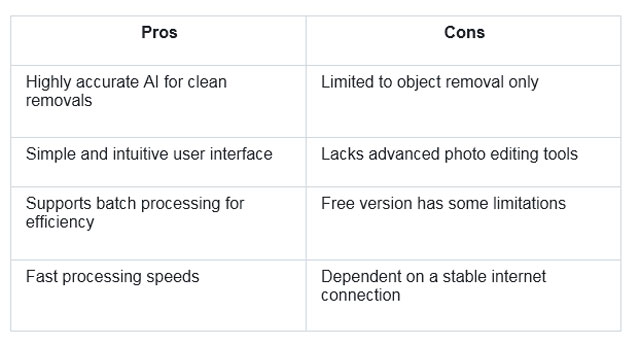
Unwatermark.ai is a dedicated tool focused solely on removing unwanted objects, text, and watermarks from images. Its strength lies in its simplicity and the power of its specialized AI. The platform is designed for users who need a quick, no-fuss solution for cleaning images without navigating a complex interface. The AI is trained to handle various types of watermarks, from simple text overlays to intricate logos, ensuring a high-quality finish.
The user experience is straightforward. You upload an image, brush over the watermark you want to remove, and let the AI handle the rest. The process is quick, and the results are often impressive, leaving little to no evidence of the original watermark. This makes it an excellent choice for photographers, marketers, and content creators who need to prepare images for professional use quickly.
Key Features
Unwatermark.ai's feature set is lean and focused, prioritizing performance over a long list of options. The core technology is built around a sophisticated algorithm that intelligently reconstructs the background where the watermark used to be. This context-aware filling is what sets it apart from more basic removal tools.
The platform supports a variety of image formats, including JPG, PNG, and WebP, making it versatile for different sources. It also handles batch processing, allowing users to upload and clean multiple images at once. This is a significant time-saver for anyone working with large volumes of content. The precision of the brush tool also allows for detailed work on complex images where the watermark might be close to important elements.
Pros & Cons
Best For
Unwatermark.ai is best for professionals and individuals who prioritize the quality and speed of watermark removal above all else. It is ideal for photographers cleaning up their portfolios, marketing teams preparing social media assets, and e-commerce businesses that need to remove supplier watermarks from product photos. Its focused approach ensures it does one job exceptionally well.
PhotoGrid: Overview
PhotoGrid is a widely known mobile-first photo and video editor that offers a vast array of features. While it's famous for its collage-making capabilities, it also includes a powerful suite of editing tools, including an AI-powered object removal function. It serves as a one-stop shop for users who want to edit, enhance, and share their creations without switching between multiple apps.
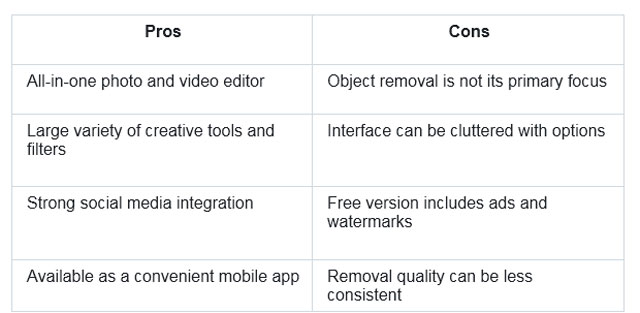
The app's interface is vibrant and user-friendly, though packed with many options that might feel overwhelming to a new user. The object removal tool is located within its broader editing toolkit. While effective, it is one of many features rather than the central focus of the application. PhotoGrid is available on both iOS and Android, making it highly accessible for mobile users who do the majority of their editing on their phones or tablets.
Key Features
PhotoGrid's strength is its versatility. Beyond object removal, it offers an extensive list of functionalities. These include photo collages, video editing, filters, stickers, text overlays, and beauty retouching tools. The AI object remover allows users to brush over unwanted elements, and the app's algorithm works to fill in the space.
The application also integrates social sharing features, allowing users to post their edited images and videos directly to platforms like Instagram, Facebook, and TikTok. It supports both photo and video editing, which is a major advantage for content creators who work with mixed media. The free version is quite robust, though it comes with ads and watermarks on exported projects.
Pros & Cons
Best For
PhotoGrid is best for casual users, social media influencers, and content creators who want a comprehensive and convenient mobile editing tool. It is perfect for those who need to quickly edit photos and videos on the go and value having a wide range of creative options in a single app. If your needs extend beyond simple watermark removal to general photo enhancement and collage creation, PhotoGrid is a strong contender.
Side-by-Side Comparison
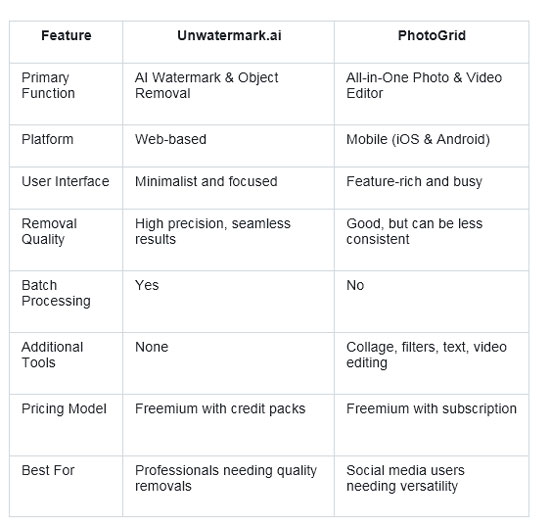
To make the choice clearer, here’s a direct comparison of the key aspects of Unwatermark.ai and PhotoGrid. This summary highlights their core differences in functionality, performance, and ideal user base.
Final Recommendation
Choosing between Unwatermark.ai and PhotoGrid comes down to your primary goal.
If your main objective is to remove watermarks, logos, or any other unwanted objects with the highest degree of accuracy and a clean, untraceable finish, Unwatermark.ai is the clear winner. Its specialized AI is fine-tuned for this specific task, delivering professional-grade results that general-purpose editors often struggle to match. The simple interface and batch processing capabilities make it a powerful tool for anyone who values efficiency and quality.
If you are a mobile user looking for a versatile, all-in-one creative suite for social media content, PhotoGrid is the better option. Its object removal tool is more than adequate for simple fixes, and its vast library of editing features, from collages to video effects, provides endless creative possibilities. It is the perfect tool for someone who wants to handle all their editing needs within a single, convenient app.
Ultimately, for dedicated, high-quality watermark removal, Unwatermark.ai stands out. For comprehensive mobile editing with a good-enough removal tool, PhotoGrid is an excellent choice.