TikTok looks simple from the outside. You post a video, it gets views, and your account grows. But once you actually start using the app regularly, things don’t always go that smoothly.
One day, your video uploads perfectly, and the next day, it just won’t post. Sometimes the app crashes while you’re editing, or your video quality suddenly drops for no reason. It can get confusing, especially because there’s no clear explanation for what went wrong.
You might start wondering if it’s your content, your internet, or something wrong with your account. And honestly, that uncertainty is what makes it more frustrating than the problem itself.
The good news? In most cases, these are common glitches or simple technical problems that can be fixed in a few steps once you understand what’s happening behind the scenes. In this blog, we will go through some common, real TikTok problems and how you can fix them.
Login Issues
One of the most common problems is when you can’t log into your TikTok account. This can be due to incorrect login details, a forgotten password, temporary suspension, suspicious activity, or even app glitches.
How to fix it:
- Use the “Forgot Password” option to reset your login details.
- Double-check your login method (TikTok, Google, Apple, etc.)
- Clear the app cache from settings.
- If your account is locked due to suspicious activity, wait for a few hours and try again.
App Crashing or Not Loading
Sometimes TikTok simply doesn’t work properly. The app may crash, freeze, or fail to load videos. This usually happens due to app bugs or outdated versions, device storage issues, poor internet connection, or too much cache stored.
How to fix it:
- Check your internet connection. Switch between Wi-Fi and mobile data to see if it improves.
- Update the app. Many issues get fixed in newer versions.
- You can also clear the cache from TikTok settings.
- If nothing works, reinstalling the app is often the easiest fix.
Videos Not Downloading Without Watermark
Sometimes you need TikTok videos to save, share, repost, or use for content ideas. But when you download them, there’s always a watermark. That’s because TikTok adds it by default to protect the original creator’s content.
How to fix it:
- There are several online websites and apps that let you download TikTok videos without watermark. You can paste the video link and download a clean version.
- Another simple trick is to screen record the video and then crop it properly. This avoids the watermark, but you may lose quality.
Video Upload Problems
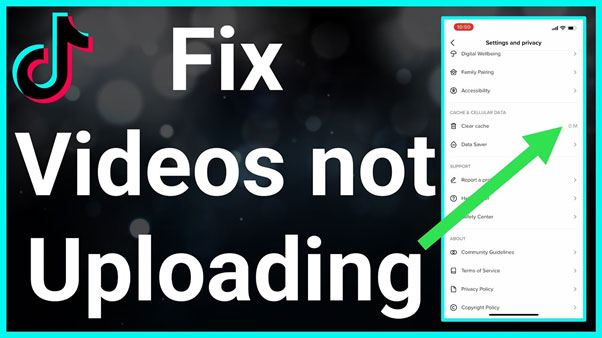
You spend time creating a video, but when you try to upload it, it either gets stuck, fails, or doesn’t process properly. This happens due to large file sizes, unsupported formats, or weak internet connections.
How to fix it:
- Make sure your video is in MP4 or MOV format.
- Keep file size within TikTok limits.
- Check your internet connection before uploading.
- Restart the app or update it to the latest version.
- If the problem continues, try uploading the same video again after some time.
Live Streaming Issues
Going live on TikTok is a great way to connect with your audience, but sometimes you face issues like not being able to start a live or facing interruptions. It could be due to not meeting the eligibility criteria or a poor internet connection.
How to fix it:
- Make sure you are 18+ and have at least 1,000 followers.
- Use a stable Wi-Fi or strong mobile data connection.
- Update your app before going live.
- Wait, if your account is still new.
Poor Video Quality After Upload
You upload a clear video from your side, but it looks blurry or compressed after posting. This happens because of low-quality recording, incorrect export settings, low lighting, or TikTok compression.
How to fix it:
- Record videos in good lighting. Natural light works best and instantly improves quality.
- Always export and upload the video in 1080p.
- Also, turn on the “Upload HD” option while uploading. This helps maintain better quality after posting.
Shadowban (Sudden Drop in Reach)
Sometimes your views suddenly drop without any clear reason. This is often called a “shadowban.” This usually happens when you post too frequently in a short time, use banned hashtags, or your content gets flagged by TikTok.
How to fix it:
- Take a short break from posting (2-3 days) and then come back with fresh content.
- Review your recent posts and remove any that might violate guidelines.
- Also, avoid copying content directly from other creators.
Features Missing from Your Account
You see others using a feature, like a new effect or tool, but it’s not available for you. That’s because TikTok doesn’t release features to everyone at the same time. Sometimes it’s based on region, account type, or testing phases.
How to fix it:
- Update your app regularly.
- Wait for the feature to roll out gradually.
- Switch between Creator and Business accounts if needed.
- Reinstall the app if the issue continues.
Account Restrictions
Sometimes TikTok restricts certain features like commenting, posting, or messaging without any warning. This usually happens if your content violates community guidelines or if there’s suspicious activity on your account.
How to fix it:
- Check notifications to understand the reason.
- Slow down your activity for a while.
- Avoid using third-party apps or automation tools.
- Submit an appeal if you think it’s a mistake.
- Avoid posting sensitive or risky content.
Videos Not Showing on “For You” Page
Many users complain that their videos are not reaching the “For You” page (FYP), which is key for growth. This might happen when your content is not engaging enough, it violates community guidelines, or you use banned or irrelevant hashtags.
How to fix it:
- Focus on engagement signals: watch time, likes, comments, and shares. If people watch your video till the end, TikTok is more likely to push it further.
- Avoid spammy hashtags. Instead of adding 20 random tags, use 4-6 relevant ones that actually match your content.
- Also, make sure your content follows TikTok’s guidelines. Even small violations can limit your reach.
Sounds and Effects Not Available
You open TikTok to use a trending sound or effect, but it’s either missing or not available for your account. This can happen due to copyright restrictions, regional restrictions, account type (especially business accounts), or app glitches.
How to fix it:
- Clear the cache and restart the app.
- Update TikTok to the latest version.
- Switch to a Creator account if you’re using a business account.
- Try searching for the sound manually.
- If it’s a glitch, restarting the app usually fixes it.
Conclusion
TikTok problems are more common than they seem. Whether it’s login issues, upload errors, missing features, or account restrictions, almost every user faces these challenges at some point. The important thing to understand is that most of these problems are not permanent. They are usually caused by small technical issues, settings, or temporary glitches. Instead of getting frustrated, focus on simple fixes, and you’ll usually resolve the issue quickly.