By aligning the publisher's brand elements with the emotional tone of the romance novels they publish, the entire marketing experience can feel cohesive and memorable.
Transform your romance novel idea into a reality using Dreamina
With Dreamina, publishers and designers have an efficient way to bring stories to life through visual representation. By describing the characters, setting, and mood of a story, these professionals can generate promotional images that are cinematic in nature and full of emotional depth.
The following process is used to create and develop these scenes: a three-step process.
Step 1: Write a text prompt
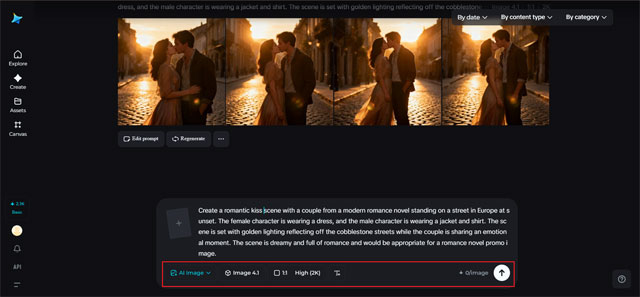
To begin with, you need to open the Dreamina creation interface. Instead of using any template, you need to write a prompt for the romantic scene you want to create. The prompt needs to be written in detail. The details need to be about the characters, their senses, the environment, etc.
For example, you can write a prompt like this: Create a romantic scene with a couple from a modern romance novel standing on a street in Europe at sunset. The female character is wearing a dress, and the male character is wearing a jacket and shirt. The scene is set with golden lighting reflecting off the cobblestone streets while the couple is sharing an emotional moment. The scene is dreamy and full of romance and would be appropriate for a romance novel promo image.
Step 2: Adjust parameters and generate
Once you have created your prompt, you will then need to modify the generation parameters to further perfect the image that will be used at the end. First, select your model of choice; then, depending on where the image will be displayed—social media posts, promotional banners, or digital book ads—you will need to select the aspect ratio. After that, select the size and a resolution that is either 1K or 2K. After all these options have been selected, click on the icon to generate images on Dreamina to create your romantic promotional scene.
Step 3: Customize and download
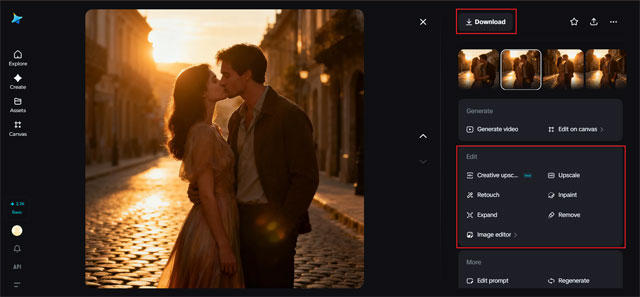
Once the image is generated, the user can customize the image using the AI image editing tools provided by Dreamina. The user can use the tools to inpaint the image, expand the image, remove objects from the image, and even retouch the image for better lighting effects. Once the image is customized, the user can download the image for use in marketing the book.
Using the promotional images for marketing
After creating the image, the publisher can use the image for marketing the romance novel or the publishing company. The images can be used for the following marketing platforms:
- For social media teaser posts before the release of the book
- For promotional images for the publisher's newsletter
- For website banners announcing the release of a new romance book
- For digital advertisements announcing the release of a romance book
Using images inspired by the story allows the publisher to create a better connection with the readers.
Final thoughts: bringing romance storytelling to life with Dreamina
Romance novels are all about strong emotions and unforgettable scenes between two people. This is why bringing these scenes to life visually can be very effective in creating engaging content for your romance novels' promotion.
Using Dreamina, you can easily turn simple descriptions of scenes into visually appealing images that capture the essence of your romance novels. This is why bringing romance storytelling to life is not just possible but also very effective.
Whether you are promoting a single romance novel or creating a brand of romance novels, Dreamina is a very effective way of bringing your readers' imagination of fictional love stories to life visually, sparking curiosity among readers about the stories inside your romance novels.